#1 Lumion Training Centre in the Region

Master Lumion &
Create Stunning Architectural
Visualizations

Transform your architectural designs into photorealistic renders and cinematic walkthroughs. Learn real-time rendering, landscape design, interior lighting, and animation workflows — all from industry experts.

What is Lumion & Why Master It?

Lumion is the world's leading real-time architectural visualization software. It enables architects, designers, and visualizers to produce high-quality renders, animations, and immersive walkthroughs directly from 3D models — without complex rendering setups.

  • Real-time render previews that save hours of production time
  • Seamlessly import from AutoCAD, Revit, SketchUp & 3DS Max
  • Create interior, exterior, landscape and aerial visualizations
  • Cinematic animation walkthroughs for client presentations
  • Industry-standard tool used by 70% of architectural firms globally
  • Build a professional portfolio for freelancing & placements
Real-Time Rendering Engine
Instant visual feedback as you design
Landscape & Environment Design
Trees, water, terrain & weather effects
Animation & Walkthrough
Cinematic camera paths & motion effects
Interior & Exterior Lighting
Sun, sky, artificial & HDRI lighting setup
Materials & Texture Library
Thousands of PBR materials included
Portfolio & Certification
Industry-recognized CADPOINT certificate

Lumion Visualization Course

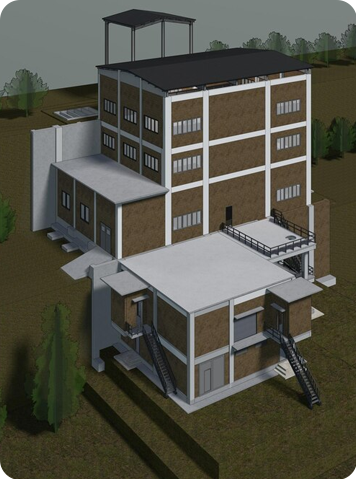
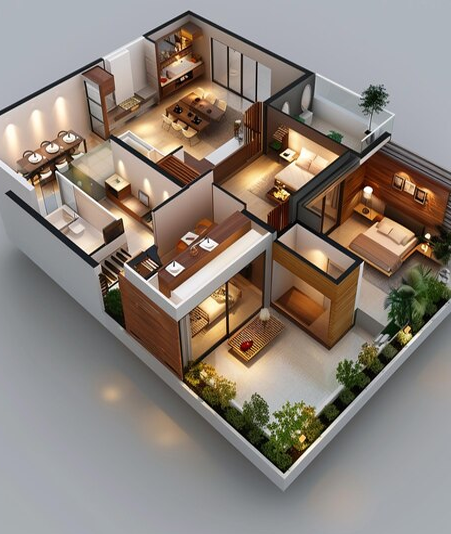
Unlike traditional rendering pipelines that take hours, Lumion delivers photorealistic previews in seconds. Learn the complete workflow from importing your 3D model to delivering a stunning final render.

10x Faster
Rendering vs traditional software
4K Output
Ultra-HD renders & videos
600+ Effects
Weather, particles & post-FX
Live Sync
Revit, SketchUp, AutoCAD
Why Choose Our
Lumion Training?

Fastest Rendering Workflow

Produce photorealistic renders 10x faster than traditional software like V-Ray or Corona. Save time and impress clients with instant previews.

Architectural Presentation Skills

Master the art of presenting your designs through stunning still images, panoramas, and animated videos that win client approval.

Project Portfolio Creation

Graduate with 5+ portfolio-quality renders and walkthroughs ready to showcase to employers or clients.

Complete Course Modules

A structured curriculum designed by industry professionals to take you from beginner to visualization expert

MODULE 01
Lumion Interface & Basics

Get comfortable with the Lumion environment, navigation tools, viewport controls, and project setup.

  • Interface layout & panels
  • Navigation & viewport tools
  • Project file management
  • Import 3D models
MODULE 02
Materials & Textures

Apply and customize a vast library of PBR materials to create realistic surfaces for any architecture style.

  • Material library exploration
  • Custom texture mapping
  • PBR material settings
  • Glass, water & metal
MODULE 03
Lighting Setup

Master natural and artificial lighting to control mood, shadows, and atmosphere in every scene.

  • Sun & sky lighting
  • Interior artificial lights
  • HDRI environment maps
  • Shadow & ambient settings
MODULE 04
Landscape Design

Create lush, realistic outdoor environments with terrain sculpting, vegetation, and water bodies.

  • Terrain sculpting tools
  • Trees, grass & plants
  • Water bodies & fountains
  • Roads & site furnishing
MODULE 05
Animation Walkthrough

Create professional cinematic camera animations and walkthrough videos for client presentations.

  • Camera path creation
  • Timeline & keyframes
  • Cinematic effects
  • Video export settings
MODULE 06
Rendering Techniques

Produce ultra-high-quality still images and 360° panoramas using Lumion's advanced render passes.

  • Still image rendering
  • 360° panorama render
  • Render output settings
  • Post-processing basics
MODULE 07
Effects & Environment

Add weather, seasons, particles, and atmospheric effects to create visually rich and dynamic scenes.

  • Rain, snow, fog effects
  • Particle system
  • Seasons & time of day
  • Lens flares & bloom
MODULE 08
Real-Time Projects

Apply all skills in end-to-end live projects — villa exterior, interior, commercial building and landscape.

  • Villa exterior project
  • Interior visualization
  • Commercial rendering
  • Portfolio compilation

Why Learn Lumion in 2026?

Lumion is reshaping how architectural projects are presented and sold — making visualization professionals indispensable

Booming Industry Demand

Architectural visualization is a $4.5B global industry growing at 25% annually. Lumion-skilled professionals command premium salaries.

Easy Learning Curve

Lumion's intuitive drag-and-drop interface lets beginners produce stunning results within days — no advanced 3D modeling skills required.

Freelance Potential

Earn ₹2,000–₹15,000 per visualization project as a freelancer. One good render can pay for the entire course fee.

Used by Top Firms

Over 1 million architects and designers worldwide use Lumion. Get skills that open doors at top AEC companies in India and abroad.

Certification Value

Our CADPOINT-certified Lumion course is recognized by hiring managers. Add it to your resume and LinkedIn for instant credibility.

Works with All Tools

Lumion connects seamlessly with Revit, AutoCAD, SketchUp, ArchiCAD, and Rhino — making it perfect for any existing workflow.

Expert Instructors

Learn from certified visualizers with 10+ years of industry experience and real-world project portfolios to guide your learning.

Placement Support

Dedicated career cell with active industry connections. We work until you get placed in a role that matches your skills and salary goals.

Exciting Career Opportunities

Your Lumion certification opens doors to multiple high-demand roles in the architectural visualization industry

Architectural Visualizer

Create photorealistic renders for architecture firms, real estate developers, and design studios

₹4 – ₹10 LPA

Very High Demand
3D Rendering Artist

Produce stunning CGI renders for marketing materials, brochures, and digital campaigns

₹3.5 – ₹9 LPA

High Demand
Interior Visualization Designer

Specialize in interior renders for furniture brands, interior design firms, and luxury projects

₹4 – ₹8 LPA

High Demand
Landscape Visualizer

Create landscape design visualizations for urban planners, landscape architects, and townships

₹3 – ₹7 LPA

Growing
Architectural Animator

Produce cinematic walkthrough videos and virtual tours for real estate marketing and presentations

₹5 – ₹12 LPA

Very High Demand
Freelance Visualizer

Work independently with global clients, earn per-project, and build a thriving visualization business

₹2K – ₹15K/project

Global Market

0+

Students Trained

0+

Projects Completed

0%

Placement Rate

0+

Years of Excellence

Frequently Asked Questions

Everything you need to know about our Lumion training program

What are the software and hardware requirements for Lumion?

Lumion requires a Windows PC with a dedicated NVIDIA or AMD GPU (minimum 4GB VRAM, recommended 8GB+), 16GB RAM, and an SSD. Intel/AMD processors from the last 5 years work well. Lumion does not run on Mac natively. We guide you on system requirements and you can also use our lab systems during training.

Will I receive a certificate after completing the course?

Yes! Upon successfully completing all modules and a final assessment, you will receive a CADPOINT-certified Lumion Course Certificate. This is an industry-recognized certification accepted by architectural firms, real estate developers, and visualization studios across India and internationally.

Do I need prior 3D modeling or rendering experience?

No prior rendering experience is required. However, basic knowledge of any 3D modeling software (AutoCAD 3D, SketchUp, or Revit) is helpful for importing models. Our course includes model preparation guidance. Complete beginners in visualization are very welcome — Lumion's interface is designed for ease of use.

Is online learning available for this Lumion course?

Yes, we offer both classroom training at our Coimbatore centre and live online sessions via Zoom. Online students get recorded session access, the same project assignments, and 1:1 doubt-clearing sessions. Live interaction is maintained so you don't miss the collaborative learning experience.

How long does the course take to complete?

The complete Lumion course is 45 hours of training, typically completed in 6–8 weeks (weekday batches) or 10–12 weeks (weekend batches). Intensive fast-track batches for working professionals are also available. You can discuss flexible scheduling options at the time of enrollment.

Start Your Visualization
Career Today.

Join 2,000+ professionals who transformed their architectural careers with CADPOINT's Lumion training. Limited seats available in the next batch.